Aha Modem broken way Quota (Quota Out)


Actually I have been using this trick for a long time but lazy postingnya.Bagi Modem users Aha this trick is useful because it does little Aha Modem users who sell the modem for the quota, the first time I bought out my aha and quotanya also intends to sell but we as creatures that god would give me reason not immediately give in and sell the modem aha ... I was looking fro onformasi after nearly two days I finally nemu is also key ...

Here is the trick Hack AHA Quota (Quota broken Aha)

You got from the AHA Quota?? follow these steps

A. Open the C: program files - AHA Dialer - Log

2. send to destop file ATRecord
3. Then delete all the code that is in the ATRecord and Save
4.Buka Aha Dialer - click Monitor - right click on the Connection Duration - click Reset Statistics

5.Koneksikan modem and enjoy the speed of your modem is already back to normal ...

NOTE:
* Buddy doing tricks above when ofline or are not connected to the internet (so if it is to execute on the new modem connect pal aha ocey sob ...)
* Ensure the removal of every day before you exceed the limit Quota Quota, Quota ie you turn off your connection 500M then reset the monitor / delete and close the driver. then you delete the existing content of posts on ATRecord
* If ya can surf all day Full many times
* Friend forgotten once Quotanya road
* As for more modem Simple Olive, lived in the monitor Recording Delete it
[Read More...]


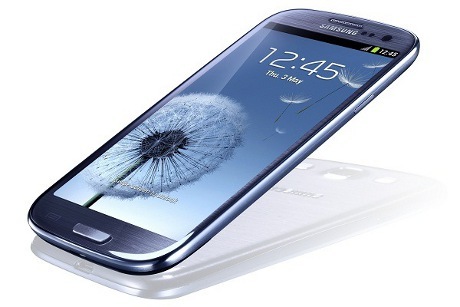
The launch of Samsung Galaxy S III


After rumors of its release several times reported, Samsung finally announced the official presence of the Samsung GALAXY S III in the 2012 event in London Samsung unpacked. Samsung Galaxy S III is following the HTC One X that also carries the quad-core processors.


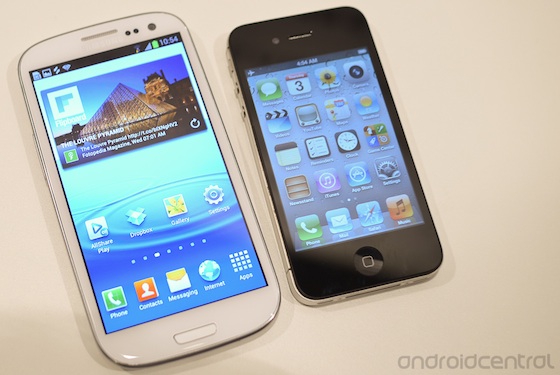
From the specification, the work of the class Android smartphone Samsung is equipped Android 4.0 or Ice Cream Sandwich and a quad-core Cortex A9 chipset 1.4 GHz Quad Exynos 4212. For the screens, Samsung Galaxy S III using Super AMOLED screen HD (1280 x 720 pixels) measuring 4.8 inches. This is the largest screen size Samsung ranks number 2 in the Galaxy (after Galaxy Note).

The camera performance is also given special attention. To the rear camera, S III presents 8 MP camera with features HDR, flash and fast performance with no lag. While the front of the camera has 1.9 megapixel resolution supports that can record HD video. Given battery capacity is also improved, reaching 2100mAh.

One feature S III lies in the design and the design approach that is more oriented to the user. Galaxy S III can recognize faces, movements and voice users.

Through the "Stay Smart", S III camera will detect your eyes and adjust the display settings according to the activity being performed. Also there is the "S Voice" which can be heard and capture your greeting. With the "S Voice", you can play your songs, adjust volume, send SMS and email, to schedule or activate the camera, just by the sound. Glance similar to the existing features of the iPhone 4S Siri.


But because they have not tried it directly, we can not comment further. Features "Smart Alert" will translate your movements. For example You are being typing SMS but decide want phoning the person is, quite dekatkan S III into ear and phones akan directly phoning the person is. When you pick up the phone is off the table (after leaving it a few times), Galaxy S III will vibrate and display a list of missed calls (if any) and other notifications.

Rows of feature Galaxy S III still continues. You will find the NFC, AllShare Cast (S III connects to the TV without the cable), AllShare Play (sharing files between the smartphone, tablet, PC and TV), Group Cast (sharing information in the display to other devices via Wi-Fi network ), S Beam (share files just by touching the S III to S III that other phones), Wi-Fi Channel Bonding (doubling the bandwidth of a Wi-Fi), Pop Up Play (play the video on the screen while running other applications such as email or web simultaneously).

Samsung Galaxy S III will be available in two versions: a version of the LTE (specifically the U.S.) and the version of HSPA + (international). Our friends in Europe will get first chance to have it at the end of this May, followed by other countries.

For Indonesia, there is still no definite timetable. While the issue price, the Samsung GALAXY S III will sell for 499 pounds or about $ 7 million.

Kristian Tjahjono, contributors to the site yangcanggih.com consumer technology. Enthusiastic about the various types of gadgets, ranging from computers, cell phones, to digital cameras.
 
[Read More...]


Microsoft Releases Social Networking Special Student


Microsoft has recently launched a social network, so.cl pronounced with a 'social'. Social network was created by Microsoft's FUSE Laboratory.

In contrast to Facebook, Twitter or Google +, so.cl more intended for students who have an interest in social media.

Microsoft describes so.cl as experimental research for students that combines a search engine and social networking for the purpose of the study.

Through so.cl, the student can menggunggah many elements of photographs, video, and text and share it with their friends. Social networking also allows students to create their own social features that are tailored to their communities.

"We hope the students continue to use products such as Facebook, Twitter, LinkedIn and other social networks, and Bing, Google and other search tools," said Lili Cheng, General Manager FUSE Microsoft Research Labs in the blog Mediabistro cited, Wednesday, December 28, 2011.

So.cl encourage students to reimagine how the communication takes place daily in researching, learning and sharing in their daily lives. Students could study the way people share and exchange information in the form of the world.

So.cl currently only available to students at the school of information and design at the University of Washington, Syracuse University, and New York University.


source; tempo
[Read More...]


Tutorial Virtual Linux “Ubuntu 10.04”


  Hellow teman-teman lama gak posting lagi banyak tugas jadi lagi sempet posting dach alvin disini akan menjelaskan masalah yang berhubungan degan sistem oprasi Linux yang lagi Tenar.
 langsung adja dach ke TKP gak usah bertele-tele...Technow

1.     Pertama, kita buka VMware yang sudah di instal di computer.

2.     Pilih Next dan dan centang pilihan yang kedua dan browse serta masukkan Iso Ubuntu 10.10

3.     Pilih next dan ini nama Virtual Ubuntu yang anda mau buat.
 
4.     Pilih next dan isi disk yang mau di pakai jika saya isi 7 GB karena tergantung juga dengan harddisk masing-masing

5. Pilih next dan cek detail tulisan yang ditampilkan kemuadian pilih Finish

6. Tunggu dan lihat

7. Jika gambar seperti di bawah jadi proses mulai booting terjadi

8. Tunggu kembali dan liat Loading-nya


9. Tunggu loading ke-dua lumayan lama coy__ jadi agak sabar yach…^_^


10. Udah slesai Coy…tinggal gunain adja memori terbatas…jadi gak usah bwat yag macem-macem cm sekedar belajar OS Linuk-Ubuntu…Oke semoga bermanfaat


Siip dach thanks udah liat nie brow...please beri komen tuk blog gue yach...heheh
[Read More...]


Tutorial Cara Mendaftar Google Adsense


Welcome any kind for my friends, this time Alvin will share tips and tricks, especially for those of you bloggers who want to look for the dollar coins Tutorial How to Apply Google Adsense. This time, Alvin will discuss about whether Google Adsense (GA)? and how the Google Adsense How to Apply?. Hopefully Helpful.


Google Adsense Tutorial How to Apply

Google adsense is a program through media Internet advertising partnership held by Google. Through the Google AdSense advertising program, web site or blog owners who have registered and been approved for membership may install a form of ad units and the material has been determined by Google in their web pages. Website or blog owners will get a profit sharing revenue from Google for each ad clicked by visitors to the site, known as Pay Per Click system (PPC) or pay per click.

Here's How to Apply Google Adsense:
  • First you must access the url google adsense http://www.google.com/adsense.
  • After the Google Adsense page appears, then you can click "Sign Up Now 'to google adsense memulain registration.
01 Tutorial Cara Mendaftar Google Adsense Tutorial Mendaftar Google Adsense Tutorial Google Adsense Tutorial Cara Mendaftar Google Adsense Tips & Trik PPC Pay Per Click irwin.web.id Google adsense adalah Google Adsense Contact Cara Mendaftar Google Adsense berbagi pengalaman Account Google
Tutorial sign up Google Adsense - Pilih Sign Up Now
  • On the next page, Google Adsense will ask you whether you already have a Google Account? if you already have a Google account, then you select "Yes, Process Google Account To Sign", but if you do not already have a google account, then select "No, Create a New Google Account". * the current instance that you have Google Adsense Account *.
02 Tutorial Cara Mendaftar Google Adsense Tutorial Mendaftar Google Adsense Tutorial Google Adsense Tutorial Cara Mendaftar Google Adsense Tips & Trik PPC Pay Per Click irwin.web.id Google adsense adalah Google Adsense Contact Cara Mendaftar Google Adsense berbagi pengalaman Account Google
Tutorial Cara Mendaftar Google Adsense - Account Google
  • After that select "Yes, Process Google Account To Sign" then you are logged on google account page.
03 Tutorial Cara Mendaftar Google Adsense Tutorial Mendaftar Google Adsense Tutorial Google Adsense Tutorial Cara Mendaftar Google Adsense Tips & Trik PPC Pay Per Click irwin.web.id Google adsense adalah Google Adsense Contact Cara Mendaftar Google Adsense berbagi pengalaman Account Google
Tutorial Cara Mendaftar Google Adsense - Login Account Google
  • If you successfully login, then you enter the website URL you want to register and language you use on the website.
04 Tutorial Cara Mendaftar Google Adsense Tutorial Mendaftar Google Adsense Tutorial Google Adsense Tutorial Cara Mendaftar Google Adsense Tips & Trik PPC Pay Per Click irwin.web.id Google adsense adalah Google Adsense Contact Cara Mendaftar Google Adsense berbagi pengalaman Account Google
Tutorial Cara Mendaftar Google Adsense - Verifikasi Website
  • Next, you enter the information contact person. * name, address and other ID cards must be such as *.
05 Tutorial Cara Mendaftar Google Adsense Tutorial Mendaftar Google Adsense Tutorial Google Adsense Tutorial Cara Mendaftar Google Adsense Tips & Trik PPC Pay Per Click irwin.web.id Google adsense adalah Google Adsense Contact Cara Mendaftar Google Adsense berbagi pengalaman Account Google
Tutorial Cara Mendaftar Google Adsense - Verifikasi Contact Person
  • And you have successfully signed up for Google Adsense. * to notice if your account is accepted, the info will be sent via email. *
06 Tutorial Cara Mendaftar Google Adsense Tutorial Mendaftar Google Adsense Tutorial Google Adsense Tutorial Cara Mendaftar Google Adsense Tips & Trik PPC Pay Per Click irwin.web.id Google adsense adalah Google Adsense Contact Cara Mendaftar Google Adsense berbagi pengalaman Account Google
Tutorial Cara Mendaftar Google Adsense -

[Read More...]


Cara Mempercepat Loading Image Pada WordPress


How to Speed ​​Loading Image In WordPress


Cara Mempercepat Loading Image Pada WordPress - WordPress LogoHow to Speed ​​Loading Image In WordPress. Join Friends For the first time will give tips on how to wordpress blog loading quickly with the image so much. So if you want to speed up loading image that we are able to move the host image into sub-domains us this because most browsers download two - four connections when downloading from a Web page server. It would be better if the image ki host in sub-domain because the browser can download the image in parallel with our website. WordPress does not support us to host image in a different domain but the support and allow it to host image in the Sub-Domain. Immediately, how How to Accelerate Loading Image In WordPress.

    A. Creating a Sub-Domain. Here please create a Sub-Domain with CPanel, for Sub-Domains are generally used img.yourdomain.com, images.yourdomain.com, After completion directly to step two.
    2. Changing the Default Image Upload Folder. Here friends - friends can be found in Settings> Media, more details can be seen in the following figure:


  1. Cara Mempercepat Loading Image Pada WordPress - Folder Upload Image
    # Here ane using a sub-domain on the Domain img MSurya.web.id
    # Move to the Sub-Domain Image. Please move all image friend - friend to the Sub-Domains that have been made ​​earlier. By Default if Teme - friend not to change there image folder in wp-content-uploads.
    # Once completed the final step friend - friend should change all the links in the previous image previous image found on the folder in the wordpress database. The following steps to change the link to the database.

         * Click on phpMyAdmin and select the wordpress database friend - friend.

    • Cara Mempercepat Loading Image Pada WordPress - phpmyadmin
    • After that, select the SQL tab in phpmyadmin.
      Cara Mempercepat Loading Image Pada WordPress - SQL
    2.
               * Then click GO.
        3. Redirect Image. This process is used exclusively for google robot or robot. This is the last step so that the robot is directed to the 404 page to index the page image as friend - friend. Well the following script in place it on file. Htaccess Here's the script:
           RedirectMatch 301 ^ / wp-content/uploads / (. *) $ Http://images.yourdomain.com/ $ 1

    Up here first for How to Accelerate Loading Image In WordPress, may be useful for the friend - friend and look forward to other tips and tricks about Wordpess and Blogging.

    • Cara Mempercepat Loading Image Pada WordPress - SQL QueryImage
[Read More...]


Labels

Recent Comments

About Me

Foto saya
Terimakasih kepada Tuhan Yang Maha Esa dan teman-teman saya atas semua yang sudah membantu saya dan memberi informasi dalam bidang Blog ini sampai saya lumayan paham tentang ilmu ini.
Return to top of page Copyright © 2010 | Platinum Theme Converted into Blogger Template by HackTutors